Graphics
Controls all rendering quality settings for the HDRP (HD and RT) versions of DanceXR. Choose a preset to get a balanced starting point, then tune individual features to hit your performance and visual targets.
Presets
Six presets cover the common range: Performance disables reflections and most screen-space effects; Medium adds fog and screen-space shadows; High enables screen-space reflections; Indoor GI and Outdoor GI activate global illumination without or with sky contribution; Dither + TAA pairs temporal anti-aliasing with dithered transparency for a clean look.
Anti-Aliasing & Super Sampling
Anti-Aliasing selects the per-camera technique — no AA, SMAA (deferred), or TAA. Super Sampling unlocks DLSS or FSR upscaling when supported, which can boost frame rate at the cost of a small sharpness trade-off.
Reflection
Screen-space reflections or a planar reflection probe. Use Screen Space mode for general surfaces; switch to Probe for flat floors or mirrors. Quality, edge fade distance, and fallback behaviour are tunable in the sub-section.
Ambient Occlusion & Global Illumination
Ambient Occlusion adds contact shadows in crevices for grounded depth. Global Illumination adds indirect bounce light — enable Fallback To Sky for outdoor scenes so surfaces facing away from lights still receive sky colour.
Post-Process Effects
Depth Of Field blurs out-of-focus objects around the tracked actor. Motion Blur adds velocity-based blur on fast movement. Bloom makes bright highlights glow. Lens Flare adds screen-space scattering around bright light sources — disable in VR to avoid discomfort.
Fog
Enable volumetric fog and set its height band and maximum render distance. Fog density itself is driven by the Fog slider in the Lighting panel.
Color Adjustment
Tonemapping, exposure, contrast, hue shift, saturation, a color filter, a two-point tone curve, and white balance all live here. The Color Curve maps input luminance to output luminance; useful for stylised looks or protecting highlights.
Options
Miscellaneous rendering flags: Transparent Prepass hides objects seen through transparent surfaces; Toon Shading switches actors or stages to a flat cel look; Dithering Transparency forces stippled blending for all transparent materials; Bump Map Shadow adds micro-shadow from normal maps; Compute Thickness enables subsurface skin effects.
Posterization
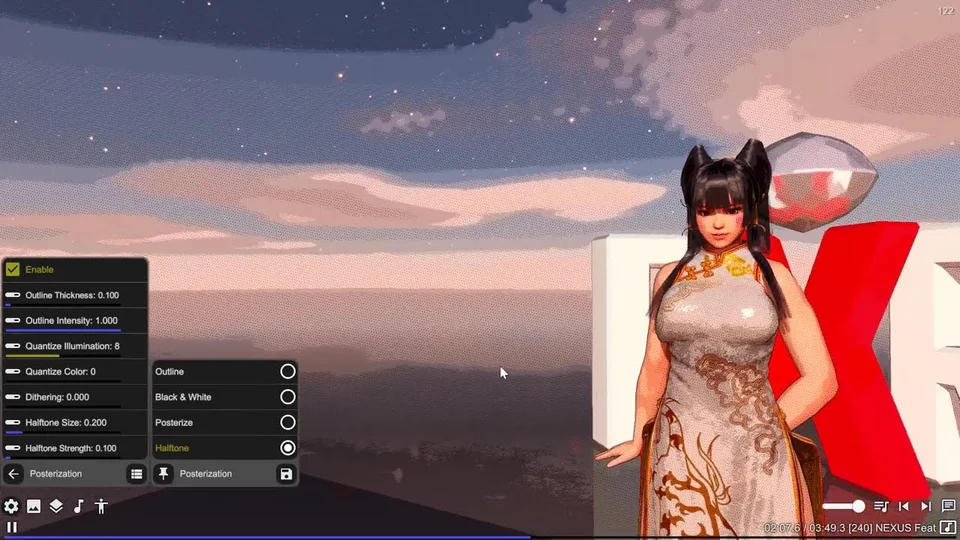
A custom-pass effect that adds outlines, posterized illumination, or a halftone screen over the final frame — useful for anime or comic-strip aesthetics.
Settings reference
Reflection
Configures screen-space reflections or a planar reflection probe. Screen Space mode ray-marches the depth buffer to find reflected surfaces — it works on any geometry but cannot reflect objects outside the camera view. Switch to Probe mode for flat surfaces such as floors or mirrors, which uses a planar capture that is always complete but costs more performance.
Algorithm
In Screen Space mode, Approximation is faster and suits most surfaces; PBR Accumulation is more physically accurate for rough materials but requires TAA to converge cleanly. Edge Fade Dist fades reflections near screen borders to hide artefacts; Object Thickness controls how deep the march assumes surfaces to be.
Sky Reflection & Fallback
Sky Reflection allows the camera sky to contribute to reflections on upward-facing surfaces. Fallback To Sky fills in reflection probe coverage for areas the screen-space pass misses, at the cost of a slight accuracy trade-off.
Posterization
A full-screen custom pass that applies stylised effects over the final rendered image. Four built-in presets give a quick starting point: Outline, Black & White, Posterize, and Halftone.
Outline
Traces edges based on depth and normal discontinuities. Control Outline Thickness and Outline Intensity to dial in the weight. Works well combined with toon shading in the Options panel for a cel-animated look.
Quantize Illumination & Color
Quantize Illumination reduces the number of luminance steps in the image; lower values (e.g. 4–8) produce a bold posterized look. Quantize Color does the same for color channels independently. Set both to 0 to disable quantization entirely and use only the other effects.
Dithering & Halftone
Dithering adds ordered noise that breaks up banding in smooth gradients. Halftone overlays a dot-screen pattern; increase Halftone Size and Strength for a vintage print aesthetic.