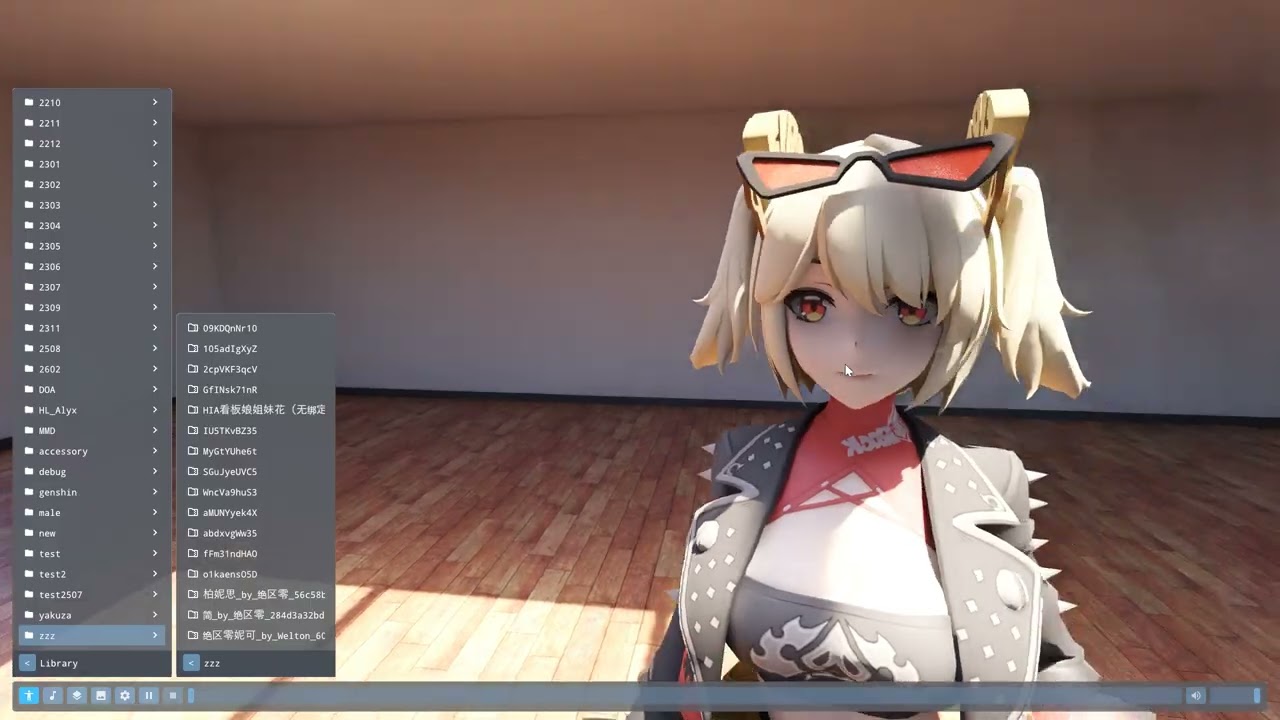
DanceXR Native
DanceXR Native is a separate, standalone Windows application built to render your characters at the highest quality your PC can manage: full path tracing on ray-tracing-capable hardware, and a raster renderer for everything else. It is a purpose-built companion to the Unity-based DanceXR runtimes, with its own renderers and settings while using the same organized content library.
After entering public preview in 2026.8, Native became release ready in 2026.9 with PMX models, multi-character scenes, and OpenXR VR support. 2026.10 added the raster renderer, automatic graphics detection, cloth, Wet Skin & Fluid, an auto camera, and VR you can enter without restarting.
Download: github.com/alloystorm/dvvr/releases/tag/dxr-native
Two renderers in one app
Native includes a path tracer and a raster renderer in the same application. On first launch it measures your GPU and chooses the renderer and quality level for you, so there is nothing to configure before you start. Run the detection again at any time with Detect best settings in System > Graphics.
What path tracing gives you
DanceXR’s PC RT build offers raytraced effects layered onto a conventional renderer (see Raytracing Effects). Native’s path tracer takes the other approach: the entire image is path traced, so lighting is simulated rather than approximated.
- Real bounced light — a wall lit by a lamp throws colored light onto a nearby face, with no probes or baking.
- Soft shadows with true penumbras that widen with distance from the caster.
- True reflections — surfaces reflect what is actually in the room, including things off-screen or behind the camera.
- Volumetric fog and light shafts — a haze layer built into the path tracer itself, so beams and god-rays come from real light transport.
Two render modes:
- Realtime — denoised and upscaled for interactive framerates. This is where you pose, frame, and play back.
- Reference — accumulates samples over several seconds for a clean, noise-free image. Use it for stills.
The raster renderer
The raster renderer is for PCs where path tracing is too slow or not available at all, including integrated graphics. It shares the same scenes, characters, materials, and physics, so a scene you build in one renderer opens in the other.
- Shadows, ambient occlusion, and environment lighting with temporal antialiasing.
- DLSS and FSR upscaling, so GPUs without DLSS can upscale too.
- On a ray-tracing GPU, optional ray-traced shadows, reflections, and global illumination bring the image closer to the path tracer at a fraction of the cost.
- Toon and unlit shading for models authored in the MMD style, described under Materials below.
Choose the renderer in System > Graphics. Switching between the path tracer and raster restarts Native and brings your scene back.
Raster quality tiers
In raster mode, Raster quality tier sets the overall level:
| Tier | What it uses |
|---|---|
| High | Ambient occlusion with ray-traced shadows, reflections, and global illumination |
| Mid | Ambient occlusion with ray-traced shadows and reflections |
| Low | Ambient occlusion with shadow maps |
| Toon | Every material shown with toon shading, over shadow maps |
| Minimal | Every material unlit, for the weakest hardware |
If a tier asks for something your GPU cannot do, Native falls back and tells you what it changed.
Requirements
| OS | Windows |
| GPU (raster) | DirectX 12 capable, including integrated graphics |
| GPU (path tracing) | Ray-tracing capable discrete GPU (NVIDIA RTX recommended) |
| VR | OpenXR-compatible headset and runtime |
If your GPU cannot run the path tracer, Native starts in raster mode instead of refusing to launch.
Supported content
This is the most important thing to know before you download.
- Models: PMX and XPS / XNALara (
.pmx,.xps,.mesh,.ascii), loose or in a ZIP. A ZIP that holds several PMX models lets you choose which one to load. - Motions: VMD (MikuMikuDance), including camera motion.
- Videos in your content library’s
videosfolder, for the room’s video wall.
PMX support includes append and inherited bone deformation, IK, vertex/bone/material/group morphs, and rigid-body physics. Facial morphs can be driven by VMD motion or adjusted from the Actors menu.
XPS models are fitted to motions the same way PMX models are, so feet stay planted. XPS dressing groups switch optional outfit parts on and off, and a bone mapping editor fixes models whose bones are not recognized automatically.
No model of your own yet? Load the built-in Dummy from Actors > Load to try a motion.
Editions and character limits
The free edition renders one character at a time. Loading a second model replaces the first, and the app shows a notice when it does. An activated Pro installation supports multiple simultaneous characters: each can have its own model settings, materials, physics, placement, and motion. With Pro, the Load mode switch chooses whether a new model replaces the cast or joins it.
Pro also unlocks Wet Skin & Fluid, described below.
Using it
Drag and drop is the primary way in — drop a model, a motion, or a ZIP onto the window and it loads. The interface is organized into tabs: Actors, Motion, Camera, Environment, Scene, and System. Sliders have -/+ buttons, mouse-wheel adjustment, and a number pad for exact values.
Native remembers your system settings between launches and restores your last session. If something in that session crashes Native during startup, the next launch skips it instead of crashing again.
Posing and motion
- VMD motion playback with audio, kept in sync on a shared clock.
- Playback modes: single, loop single, list, loop list, and shuffle.
- Shuffle picks the next dance or swaps in another actor, and learns from what you watch.
- Per-motion settings for music offset, rest pose (including T-pose), and Center pivot, which corrects motions converted from game rigs. They apply to every character using that motion.
- Procedural idle motion when no clip is playing, plus eye contact so the character can look at the camera. Characters with eyelid bones blink and move their eyelids with their gaze.
- Leg IK and a feet-on-floor solver, so feet plant on the ground rather than floating or sinking.
Physics
- Hair, clothing, and soft-body physics are organized into named groups, each with its own tuning, on/off switch, and presets. Pick bones directly in the viewport when setting a group up.
- Body colliders, plus PMX-authored rigid-body physics.
- A cloth garment can be added to any character from its Physics menu. The skirt fits itself to the waist, collides with the body, and comes with presets you can extend.
Wet Skin & Fluid (Pro)
Water droplets land on a character, run down the body, merge, and leave a wet trail behind them. Droplets respond to the character’s own motion, so a fast swing carries water along a limb and can throw it off. It works on skin and clothing together, with wet-look hair, and its settings are saved with each model.
Camera
- Free-fly and orbit cameras, plus VMD camera motion.
- Auto camera cuts a dance into shots on the beat, with controls for pace, movement, angles, and how close the camera gets.
- Tap beat in the Motion menu sets a song’s tempo, or enter BPM and beat offset directly. Timing is remembered per song.
Placing characters
Hover a character’s feet to bring up the interaction disc: drag to move on the ground plane, scroll to rotate. The disc is real emissive geometry, so its glow actually lights the character.
Scenes and rooms
A procedural room with real window openings, adjustable lighting, and volumetric fog serves as the default environment. Its front wall can be a practice mirror or a video wall that plays in sync with the music, as a lit screen or an LED wall. Scenes can be saved and reloaded by name, preserving the full character roster, placement, materials, and motion assignments.
Lights can be repeated as a fan, grid, or row, and spot lights can follow your actors automatically.
Materials
Per-material controls for roughness, metalness, anisotropy, and subsurface scattering, with name-group remapping so you can adjust every “hair” material at once. Skin, hair, and outfit groups also carry group-wide subsurface scattering, surface detail, and visibility.
In raster mode each material has a shading model — Lit, Toon, or Unlit — set per material, per group, or for a whole character. Toon uses the model’s own toon ramp, sphere map, and outline.
VR
- Enter and leave VR from System > VR without restarting, or start Native in VR from the DanceXR Launcher.
- Desktop and VR keep separate graphics settings, and each headset keeps its own. A first VR session tunes itself in about ten seconds.
- Foveated path tracing lowers the cost of the edges of your view, and follows your gaze on headsets with eye tracking.
- Choose which OpenXR runtime Native uses without changing your PC’s default.
- Buttons can be remapped across VR controllers, gamepad, and keyboard.
Reporting problems
Native writes a per-session log and a crash dump if it falls over. The System tab has Report Issue, Copy Diagnostics, and Open Log — please include the log when you report something.
Related pages
- Raytracing Effects — raytraced effects in the DanceXR PC RT build
- Graphics
- Organizing Model Files