Lighting
Controls all scene lighting — a directional sun, up to three independent light groups, and global brightness controls. Built-in presets give a complete working look in one tap; every parameter is then freely adjustable.
Presets
The built-in presets — Sunset, Daylight, Window, Stage, Projector, and others — establish a complete lighting setup in one tap. Apply the closest preset and tune individual groups from there.
Overall Intensity & Sky Ambient
Overall Intensity scales every light group and the sun together, letting you push or pull the whole scene brightness with one slider. Sky Ambient controls indirect skylight; raising it brightens shadowed areas and reduces harsh contrast, especially in outdoor scenes.
Sunlight
The Celestial sub-section controls the directional sun (and moon on HDRP). Time of day, orientation, and ecliptic angle determine where the sun sits in the sky and the resulting shadow direction.
Additional Light Groups
Additional 1, 2, and 3 are independent, fully configurable light groups — typically key, fill, and rim. Each can be a spotlight, point light, area light, or projector, and can track actors dynamically.
Fog
Adds depth haze between the camera and the scene. Low values give a subtle atmospheric cue; higher values can dramatically shift the mood. Fog interacts with volumetric light cones for dramatic beam effects.
Light & Shadow Limits
Light Limit caps how many active lights are rendered simultaneously. Shadow Limit caps the subset that cast shadows — shadows are expensive, so keep this low (1–4) unless performance allows more.
Allocation
When light groups use Follow Actor or Maintain Distance dynamics, Allocation controls how lights are spread across multiple dancers. By Distance minimises total travel for a natural look; By Index (Fixed) pins lights to specific actor slots. Refresh Interval sets how many beats pass between reallocations.
Settings reference
Sun / Moon / Time
Controls the directional sun (and, on HDRP, the moon and night sky). The sun position is defined by Time of Day, Orientation, and Ecliptic Angle, giving full creative control over shadow direction and sky colour.
Sun Position
Time Of Day moves the sun along its arc in hours (0–24). Orientation sets the compass direction the sun rises toward. Ecliptic Angle tilts the orbital plane — useful for matching a specific location or season without precise sun tracking.
Intensity & Color
Sunlight Intensity and Color Temperature control the raw brightness and warmth of the directional light. Because sunlight is very powerful, scenes with it enabled typically need a higher exposure or lower Overall Intensity to avoid blow-out.
Moon & Night Sky (HDRP)
On HDRP the same sub-section controls moon position, phase, and earthshine, plus the brightness of stars and aurora. Disable the sun and raise moonlight intensity for night scenes.
Window Effect
The Window sub-section casts a grid of rectangular shadows that simulate light streaming through window panes. Place the window with Position, Bottom, and Orientation, size it with Width, Height, Rows, and Columns, and the sun controls above determine the beam direction through it. The Sky Light option adds a soft fill from the same direction to complement the shadow.
Light group settings (Additional 1)
A configurable group of one or more lights, positioned relative to the scene or an actor. Three groups are available in the Lighting settings, typically used as key, fill, and rim lights, but each is configured identically through this sub-section.
Type & Cookie
Type selects the light shape: Spotlight, Point, Area, Pyramid, or Box projector. Cookie maps project a pattern through the beam (Window, Blinds, Spot, Tube, Video). Set Emitter Radius to soften the cone or cookie edges, and Visible to control how bright the light source itself appears in the render.
Position & Orientation
Distance and Height place the light relative to its target, Angle tilts it downward, and Orientation rotates it around the vertical axis. On spotlight types, Size X / Y widens the beam cross-section; Cone Length controls the volumetric scatter depth.
Dynamics
Dynamics determines whether the light stays fixed (Stationary), orbits the assigned actor (Follow Actor / Behind Actor), or trails at a set radius (Maintain Distance). Enable Use Actor Position to orient the light relative to where the actor is facing. Actor assignment is handled by the Allocation settings in the parent Lighting panel.
Repeat (Array)
The Repeat sub-section multiplies the light into an array. Choose Circle formation for a ring of stage beams or Grid for a ceiling rig. Presets such as 4x Fan or 8x Circle set the array up in one step.
Suspension
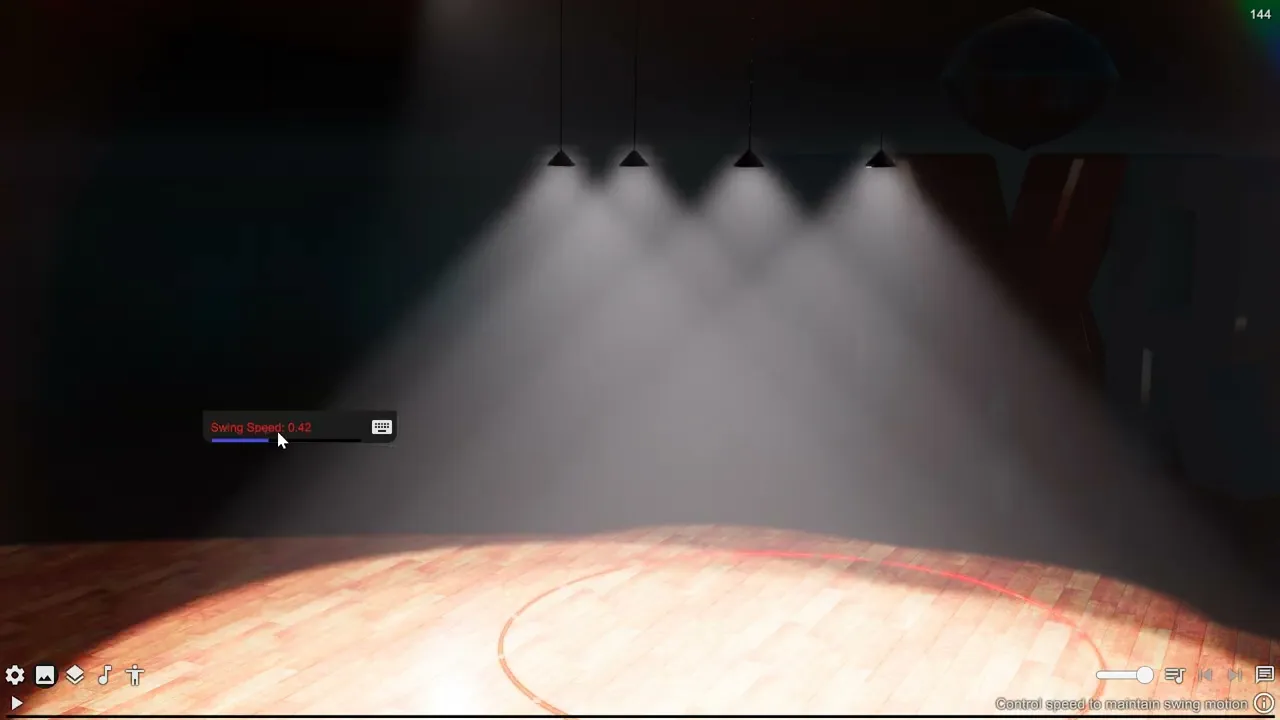
Enable Suspension to hang the light from a virtual rigging point, giving it a slow pendulum swing. Segments sets the number of cable joints, Suspension Distance the drop length, and Swing Speed how actively it maintains its swinging arc.
Shadow
Each group has independent shadow controls. Leave mode at the default to inherit the global scene quality, or override it to force raytraced or screen-space shadows on this group. Shadow Dimmer softens the shadow without fully disabling it.
Additional 2
See Light group settings. Defaults and available controls for this instance are listed in Config Reference.
Additional 3
See Light group settings. Defaults and available controls for this instance are listed in Config Reference.
Auto Exposure
HDRP auto-exposure settings that control how the camera adapts to changes in scene brightness. When disabled, the camera uses a fixed exposure driven by the global dim slider; when enabled, it adjusts continuously based on scene luminance.
Metering Mode
Determines which part of the frame is sampled to measure brightness. Average reads the whole frame uniformly; Spot reads only the centre; Center Weighted emphasises the centre while including the periphery. Use Spot or Center Weighted when a bright background would otherwise cause the subject to appear too dark.
Compensation & Range
Compensation shifts the target exposure up or down in EV steps. Range clamps the minimum and maximum allowed exposure values, preventing the camera from going too dark in black scenes or too bright in blown-out environments.
Adaptation
Controls how quickly exposure changes when lighting conditions shift. Normal gives a gradual, cinematic response; Fast reacts quickly to sudden changes; Instant snaps to the new exposure with no delay.