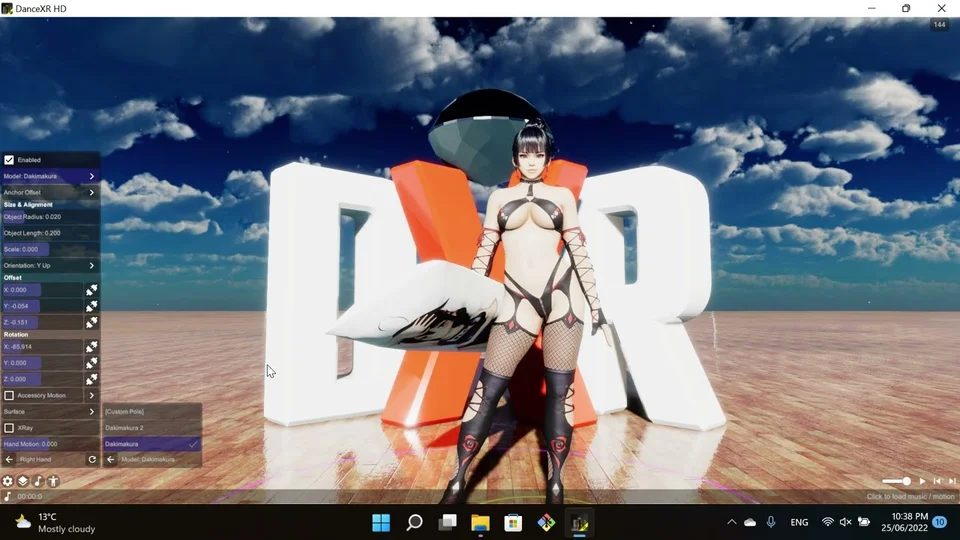
Accessory
Attaches props and objects to specific bones on the actor model. Seven attachment points are available: Pole, Left Hand, Right Hand, Chest, Head, Left Foot, and Right Foot.
Each attachment has its own panel for model selection, size & alignment, surface material, motion oscillation, and XRay cross-section rendering. The common controls are explained once below; each attachment retains its own values in Config Reference.
First attachment
Open Accessory on the actor, enable Left Hand, and choose a model. Use Size & Alignment to rotate and size it, then adjust Offset to place the prop in the hand. Turn off the attachment to remove it from the scene.
Attachment differences
| Point | Particular controls and behavior |
|---|---|
| Pole | Pull Hands attracts nearby hands. Procedural length defaults to 3. |
| Left / right hand | Grab Pose and Hand Motion are available. Procedural length defaults to 0.2. Right-hand offsets and rotations are mirrored. |
| Chest / head / feet | Use alignment and anchor offsets to fit the selected body part. Procedural length defaults to 0.2. |
Symmetrical Hands copies all settings from the left hand attachment to the right hand so you only need to configure one. Symmetrical Foot does the same for foot attachments.
Settings reference
Attachment settings (Pole)
Configures a prop (model or procedural geometry) attached to a specific bone on the actor. Supports pole objects, hand-held items, and anatomy props with motion, XRay cross-section, and surface shading.
Model selects the loaded accessory or uses the default procedural geometry. Anchor offset, accessory config, and surface settings are available in nested sub-panels.
Motion applies up/down oscillation to the attachment. Pull Hands (pole mode) draws nearby hands toward the pole surface; Grab Pose auto-adjusts hand grip; Hand Motion offsets hands relative to the attachment’s movement.
XRay renders a translucent cutaway through the prop. Intensity controls visibility, while Radius, Height, Offset, and Color define the cylinder shape and tint. Alpha adjusts overall material transparency.
Anchor offset (Anchor Offset)
Fine-tunes the anchor bone’s position and rotation before any attachment offsets are applied. Both Position and Rotation are small adjustments (±1 unit, ±90 degrees) to compensate for skeleton variations between models.
Size and alignment (Size & Alignment)
Controls the physical dimensions and spatial alignment of an attachment prop. Object Radius and Object Length define the size of procedural geometry (e.g. poles). Scale is a logarithmic multiplier for loaded models.
Orientation picks the default facing axis (Y/X/Z Up/Down). Offset and Rotation apply local-space adjustments after orientation. Guitar Mode rotates the prop to track hand position as if strumming.
Toon shading (Toon Shader)
Overrides the actor’s material with a global toon shader.
Enable the toggle to replace all materials with a unified toon style. Adjust Shading and Shadow for the light/dark balance, Outline for edge thickness, and Ambient for the fill light level.
Highlight Area and Soft Highlight control how sharp the bright areas are. Shadow Area and Soft Shadow do the same for dark areas.
Specular and Soft Specular add shiny reflections to lit surfaces.
Receive Shadow (non-HDRP only) lets the material receive shadows from other objects.
Special shader (Special Shader)
Overrides the shader type for all materials on the actor.
Mode selects the shader: Off uses the default shader; Refraction Thick/Thin simulates glass with refractive transparency; Outline renders only the outline edges; Unlit disables all lighting; Experiment is a placeholder for custom shader effects.
Refraction controls the index of refraction for glass modes — higher values bend light more.
Thickness adjusts the perceived depth of thin glass refraction.
Attachment motion (Motion)
Drives rhythmic up/down oscillation on an attachment prop, synced to the music beat. The toggle enables motion; Distance sets the travel range; Angle controls the tilt at peak extension. The nested speed config defines the beat curve and timing pattern.
Color and glow (Color)
Holds a base color and glow intensity for audio-reactive elements. Glow is multiplied with the color and animates with the beat when auto-update is enabled.
Left Hand
See Attachment settings. Defaults and available controls for this instance are listed in Config Reference.
Right Hand
See Attachment settings. Defaults and available controls for this instance are listed in Config Reference.
Chest
See Attachment settings. Defaults and available controls for this instance are listed in Config Reference.
Head
See Attachment settings. Defaults and available controls for this instance are listed in Config Reference.
Left Foot
See Attachment settings. Defaults and available controls for this instance are listed in Config Reference.
Right Foot
See Attachment settings. Defaults and available controls for this instance are listed in Config Reference.