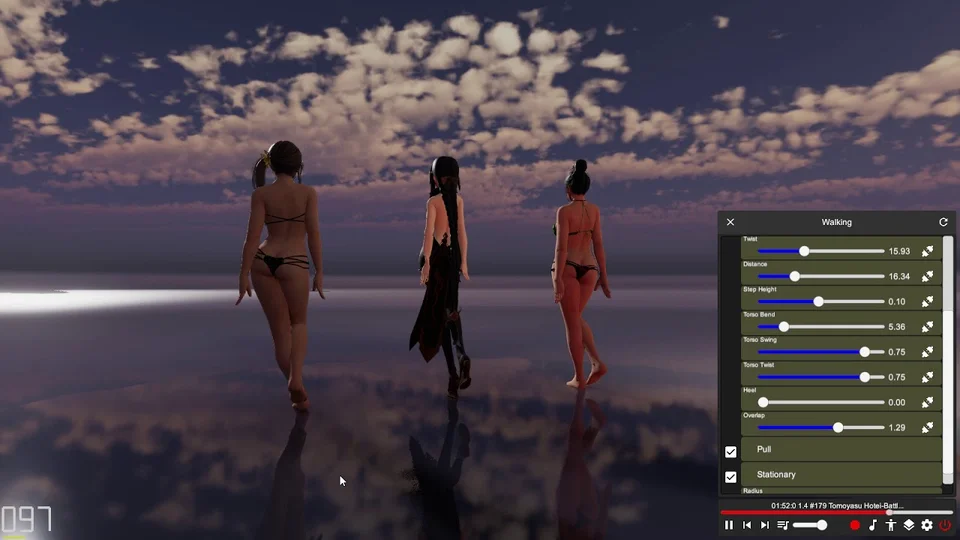
Catwalk Motion
Catwalk is a procedural walking cycle that follows music timing. Its settings shape the stride, hip movement and posture. Select it from the procedural motion list, then play a track and check Music Timing before tuning the step.
Shape the stride
Start with the defaults and adjust Distance and Step Height. Distance is the angle of leg movement, rather than a destination picker. Step Height controls foot clearance.
Step Rise chooses where the foot reaches its highest point: below 0.5 lifts earlier, above 0.5 lifts later. Step Shape changes the lift arc from pointed to a plateau. Curve changes timing within a step; negative values slow the body around mid-stance.
Use Stance Knee to avoid a locked support leg, Toe Off to tune the push-off, and Heel Strike to adjust how the foot presents the heel before landing. Inspect a full cycle after each change.
Posture and upper body
Swing and Twist control the hips. Torso Swing and Torso Twist control how that movement carries into the chest. Lean sets chest lean, and Head Follow controls how much torso rotation the head follows; zero keeps the head oriented in world space.
Set the hand poses to finish the pose. Compare with Hands Symmetrical enabled when both arms should match. Keep hip and torso adjustments small until the leg cycle looks natural.
Troubleshooting
If shoes intersect the ground, review Heel, step height and Feet Adjustment. If the legs twist or bend in the wrong direction, check skeleton mapping and actor troubleshooting. Change to Idle Motion or another motion to stop the catwalk cycle.