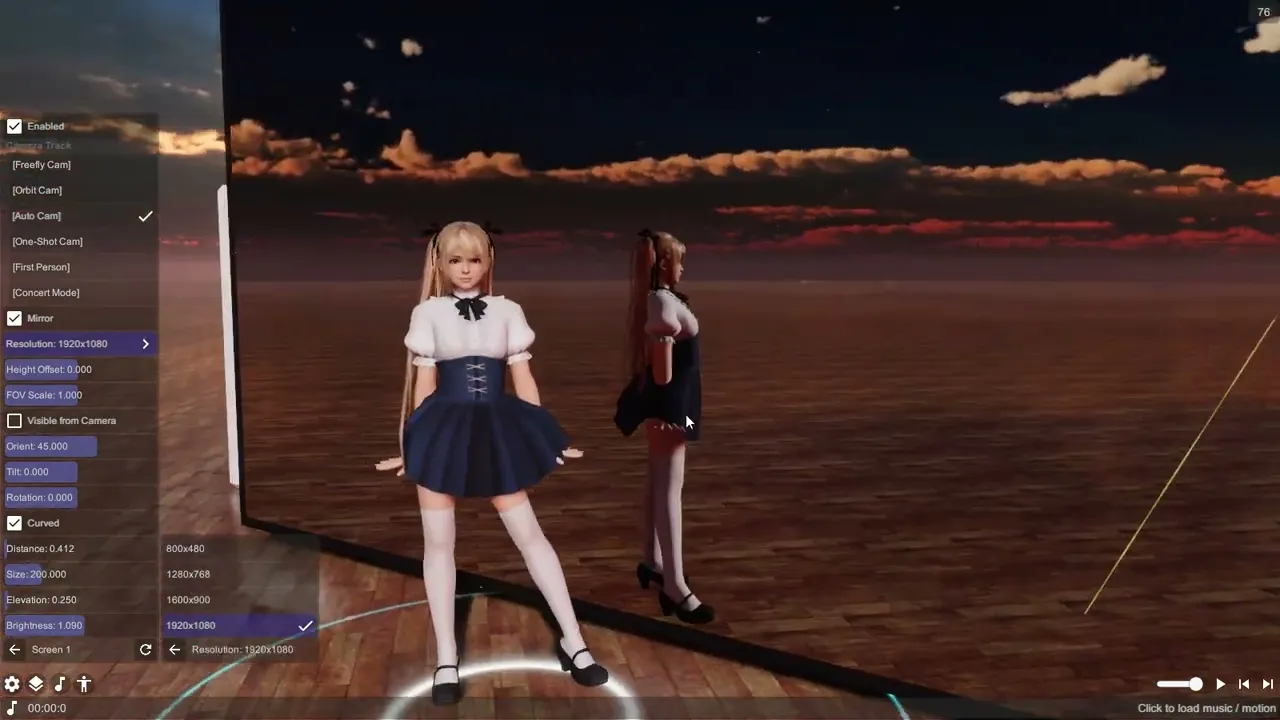
Mirror
The built-in Mirror prop shows the scene from the viewer’s reflected position. Use it for a dance-studio wall or to inspect a pose from another angle. Screen is a separate prop for video and camera feeds.
Place a mirror
- Add the built-in Mirror from the props browser and position it using the prop’s placement controls.
- Open its settings. Adjust Size, Elevation and Tilt so the actor fits inside the reflected view.
- Use Frame to set the border thickness and Shadow to choose whether the prop casts a shadow.
- Select Resolution and inspect the mirror from your normal viewing distance. Available choices include 800×480, 1280×720, 1920×1080, 800×2000 and 1200×3000.
- Adjust Gloss Coat and Smoothness for the surface; on HDRP, Brightness also changes its glow.
Check visibility and performance
Face the reflecting surface and compare the actor’s position with its reflection. If the actor is outside the view, adjust the mirror placement and tilt before changing resolution. Higher capture resolution increases the rendering work; use the lowest resolution that looks acceptable at the size shown in your shot.
In VR, the mirror maintains separate reflected camera views for the eyes. Inspect it in the headset after placing it, because a desktop view alone cannot verify stereo depth.
The mirror’s Resolution setting controls its own capture. It is separate from the graphics settings for screen-space or planar reflections on ordinary materials.
Related tools
- Props for loading and positioning scene objects.
- Screen for displaying playback video or a camera feed.
- Room Stage for a procedural room around the scene.